Artificial Intelligence
the AI interactive loop
How to manage regression testing with better, smarter and more robust test automation. Try Agilitest for free. Open Source scripting format.
Why AI-Driven Automation demands an interactive loop ?
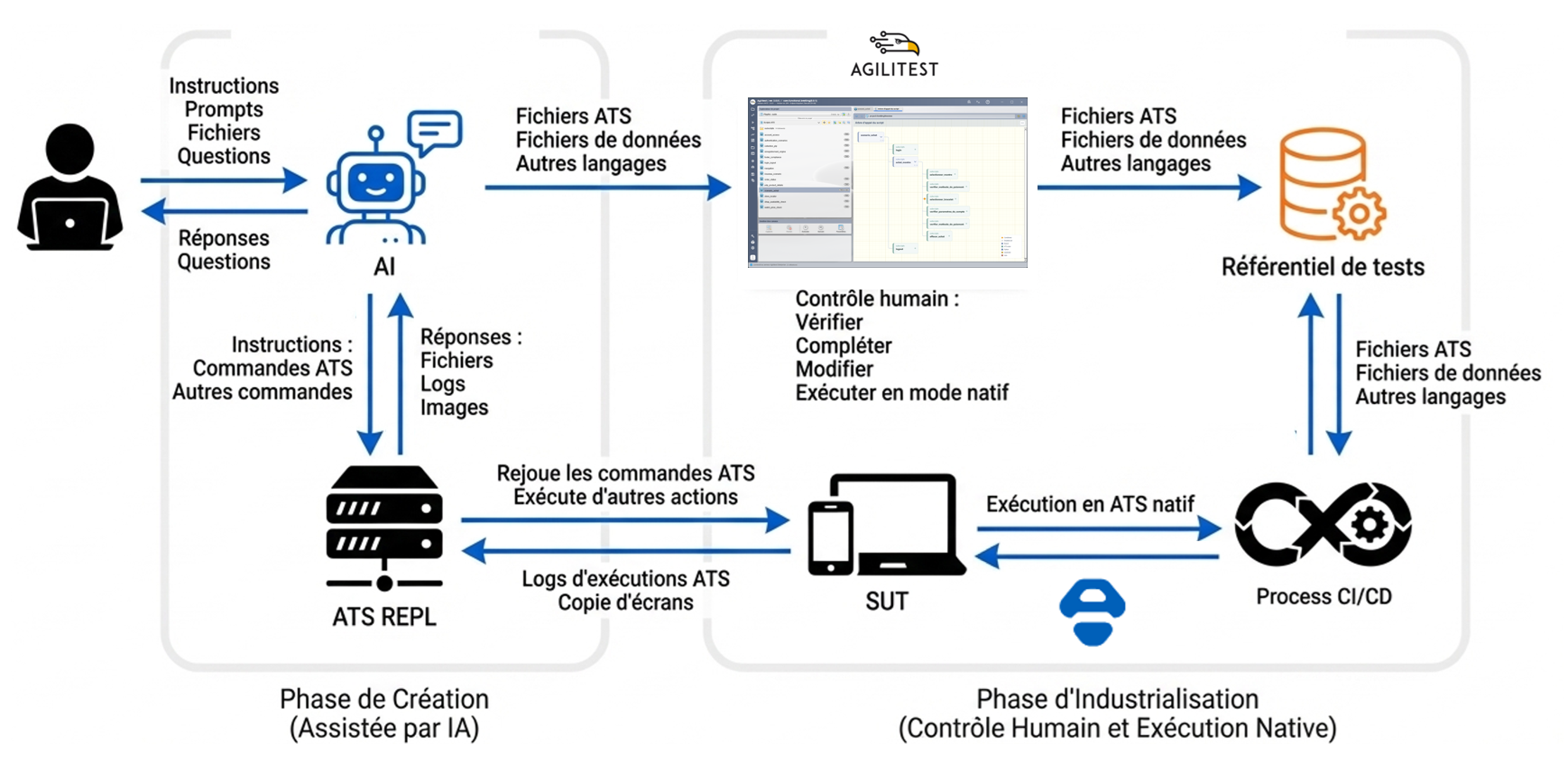
Modern AI models can generate code… but they cannot see your application . Most AI-generated test scripts still: • guess selectors, • hallucinate element paths, • produce fragile automation, • require manual correction. That’s because typical approaches rely on static code generation without runtime feedback . Agilitest introduces a different approach. Instead of generating blind scripts, the AI interacts with the application through an interactive execution loop . This mechanism is widely known in computer science as a REPL (Read–Eval–Print Loop) . In Agilitest, we call it the AI Interactive Loop . It allows the AI to observe the application, validate actions, and build reliable tests step by step. With the AI Interactive Loop , the AI: ✅Explores the application through a machine-friendly protocol, ✅ Receives structured feedback about actual elements , ✅ Validates intent before recording actions , ✅ Builds functional tests reliably . The AI no longer guesses.It observes, evaluates, and then acts .
What the Agilitest ATS-REPL Is
The REPL is a lightweight HTTP server that exposes an interface between your application and an AI agent. Unlike a developer console, it is machine-first : ✅ accepts structured commands ( find , screenshot , click , keyboard , etc.) ✅ returns structured responses (not DOM dumps) ✅ differentiates exploration vs. recording ✅ logs compactly and consistently This lets the AI observe before acting .
How It Works – In Practice
Step 1 — Launch the REPL Server Start an AI agent based on the root of your ATS projet starts a REPL on a local port. (e.g., Claude, GPT) connects and begins a session. The memory.md contains allrequired information for the agent to be informed of how the REPL server works This session lasts for one scenario and can be torn down after. Step 2 — Exploration Commands The AI uses the REPL exploration commands to inspect the page (ATS commands, screenshots) and gets feedback Key point: Exploration responses are structured , not guessed. AI sees real element metadata . Step 3 — Validate Before Recording Once an element is found, the AI doesn’t immediately record a step. Instead it uses the REPL to: ✅ verify the element exists ✅ confirm correctness ✅ choose the most stable action ✅ verify that this action insures the functionnal consistency of the test ✅ plays the action before going on Only after this validation is the step saved into a functional ATS script. This eliminates: • blind code generation • brittle selectors • unstable tests Step 4 — Interactive Feedback During all that time, the AI hase given to the user a real-Time Feedback : Summarize detected elements, explain decisions, confirm assumptions, ask for clarification, display validation results This makes the process collaborative — not opaque : The user always understands what is being created. Once the scenario is complete, the REPL enables: ✅ saving ATS scripts ✅ Creating subscripts ✅ Generating data files (CSV, JSON) ✅ Organizing project structure ✅ Files are written directly into the Agilitest project Step 5 — Open and Control the Project in Agilitest This is the critical human step. Once files are generated, the project can be opened directly in Agilitest. Here, users can: ✔ Verify the generated ATS scripts ✔ Review functional decomposition ✔ Modify steps visually ✔ Adjust selectors if needed ✔ Edit data files ✔ Add new iterations ✔ Refactor subscripts ✔ Run native ATS execution This is not a black box. The AI accelerates creation. The human keeps control.
See Agilitest in action. Schedule a demo
And see the benefits you can unlock from smart test automation.
The tests scenarios can be replayed in ATS, our Open-Source backbone. For free and forever.
spaceship